Jamie
Jamiewp:image {“id”:11771,”sizeSlug”:”full”,”linkDestination”:”media”,”align”:”center”}

/wp:image
wp:paragraph
Accidentally deleted your precious photos? Mistakenly click on a suspicious link? Losing important data is tough. The data in question is all your valuable files—including pictures of your loved ones, essential work documents, and personal messages, just to name a few.
/wp:paragraph
wp:paragraph
A quick Google search would reveal countless ways to recover lost data. Most of them involve overly long and complex methods that don’t even work. Without a capable third-party Android data recovery software, retrieving your lost files is nearly impossible.
/wp:paragraph
wp:paragraph
Stellar Data Recovery for Android claims to restore deleted photos, videos, contacts, call logs, and more with ease. But is it truly as good as it claims to be? Let’s find out.
/wp:paragraph
wp:paragraph
First, let me walk you through how Stellar Data Recovery software works.
/wp:paragraph
wp:heading
How Stellar Data Recovery for Android Works: A Simple Breakdown
/wp:heading
wp:paragraph
Stellar Data Recovery for Android simplifies the process of retrieving lost files, but it’s not a magic fix for every data loss scenario. The software works by scanning your phone’s internal memory, even if there’s no backup available.
/wp:paragraph
wp:paragraph
All you need to do is connect your Android device to a Windows PC, enable USB debugging, and initiate the scan.
/wp:paragraph
wp:paragraph
For cases of accidental deletion, malware infections, or even empty Recently Deleted folders, Stellar performs reasonably well. However, recovery success can vary depending on how soon you attempt retrieval—files that have been overwritten are usually gone for good.
/wp:paragraph
wp:paragraph
Additionally, while the software claims to recover data from broken or unresponsive phones, this is highly dependent on the extent of the damage.
/wp:paragraph
wp:paragraph
A completely dead device with no access to internal storage may be beyond its reach. Still, for less severe cases, Stellar provides a user-friendly solution with decent recovery capabilities.
/wp:paragraph
wp:heading {“level”:3}
What Kind of Data Can It Recover?
/wp:heading
wp:list
- wp:list-item
- Media Files: The software scans Gallery and File Manager locations to recover deleted photos, videos, and audio files. However, the recovery success rate varies significantly based on how long ago the files were deleted and whether the storage space has been overwritten.
- Contacts, Call History & Messages – If your contacts, call logs, or text messages disappeared due to accidental deletion or phone resets, Stellar can scan and recover them.
- WhatsApp Chats and Business Attachments – WhatsApp Content: For both personal and business WhatsApp users, the software offers recovery of chats and attachments. However, this feature depends heavily on whether the files are still physically present on the device’s storage.
/wp:list-item
wp:list-item
/wp:list-item
wp:list-item
/wp:list-item
/wp:list
wp:heading {“level”:3}
Supported Android Devices
/wp:heading
wp:paragraph
Stellar works on Android devices running version 6.0 through Android 14, including major brands like Samsung and OnePlus. One notable advantage is that it doesn’t require root access, preserving your device’s warranty and security features.
/wp:paragraph
wp:paragraph
However, this non-root approach also means the software has limited access to certain system areas, which can affect recovery results.
/wp:paragraph
wp:paragraph
Alright, it is time to look at how to use Stellar Data Recovery for Android.
/wp:paragraph
wp:heading
How to Recover Your Data Using Stellar Android Data Recovery Software
/wp:heading
wp:paragraph
Recovering lost data with Stellar Data Recovery for Android is a straightforward process, even for non-tech users. Here’s how it works:
/wp:paragraph
wp:heading {“level”:3}
Step 1: Connect Your Device
/wp:heading
wp:image {“id”:11770,”sizeSlug”:”full”,”linkDestination”:”media”,”align”:”center”}
/wp:image
wp:paragraph
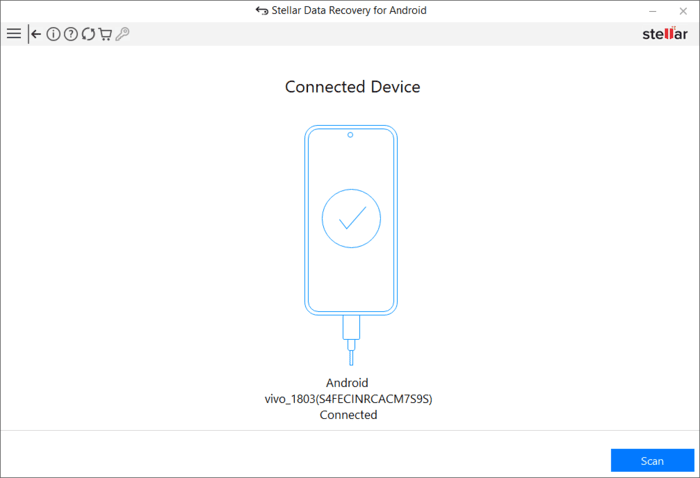
First, install and launch the software on your Windows PC. Select the type of data you want to recover, then connect your Android device using an OEM USB cable. When prompted, choose “Transfer Files” in the USB options to establish a connection.
/wp:paragraph
wp:heading {“level”:3}
Step 2: Enable USB Debugging
/wp:heading
wp:image {“id”:11769,”sizeSlug”:”full”,”linkDestination”:”media”,”align”:”center”}
/wp:image
wp:paragraph
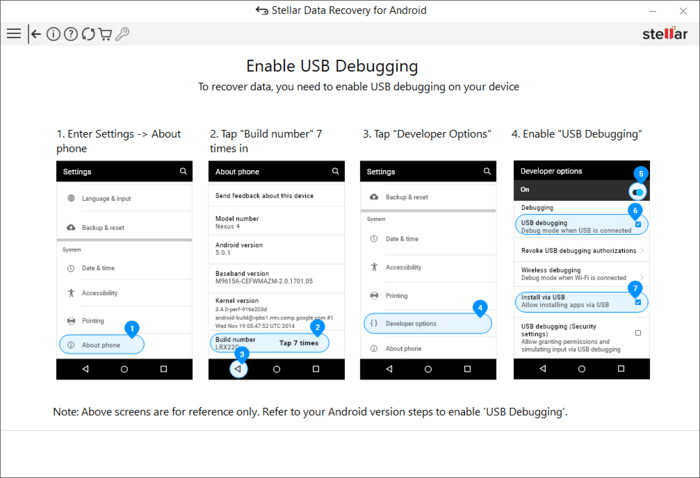
To allow the software to access your phone’s storage, you need to enable USB Debugging (for Android 4.2 and later). Here’s how:
/wp:paragraph
wp:list
- wp:list-item
- Open Settings > About Phone
- Tap Build Number seven times to unlock Developer Options
- Go to Developer Options, scroll down, and enable USB Debugging
/wp:list-item
wp:list-item
/wp:list-item
wp:list-item
/wp:list-item
/wp:list
wp:heading {“level”:3}
Step 3: Scan and Preview
/wp:heading
wp:image {“id”:11768,”sizeSlug”:”full”,”linkDestination”:”media”,”align”:”center”}
/wp:image
wp:paragraph
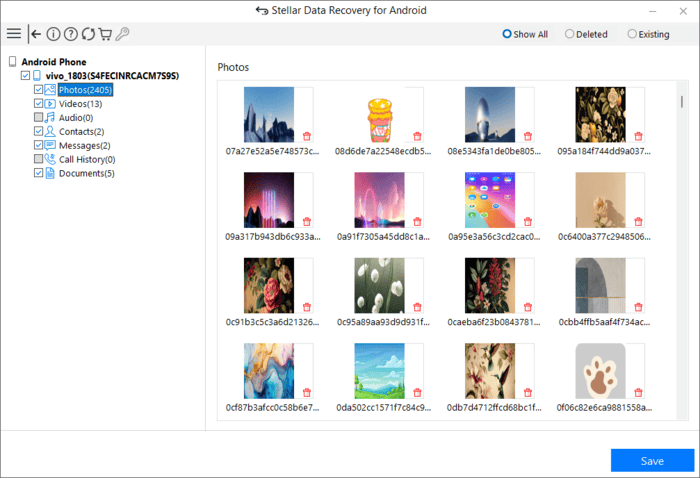
Once debugging is enabled, select the file types you want to recover from the main screen and click Scan. The software will prompt for permission—grant access to allow scanning.
/wp:paragraph
wp:paragraph
After scanning, a Preview Window displays recoverable files. Browse through them, select the ones you need, and choose a save location on your computer.
/wp:paragraph
wp:paragraph
Note: The exact location of Developer Options might vary depending on your Android phone’s manufacturer. Some phones have it under “Additional Settings” or “System”.
/wp:paragraph
wp:heading
Is Stellar Data Recovery for Android Costly?
/wp:heading
wp:paragraph
Premium services come at a cost. Stellar Data Recovery for Android charges a reasonable amount for the comprehensive recovery features it delivers. Their pricing plans are broadly divided into two straightforward tiers to suit different user needs.
/wp:paragraph
wp:list
- wp:list-item
- The Standard plan is priced at $29.99, which includes a 1-year license that can be used on up to three Android devices. For 5 devices, you have to pay $39.99
/wp:list-item
/wp:list
wp:paragraph
This plan covers all essential Android data recovery features and is suitable for most users who only need to recover data from Android devices.
/wp:paragraph
wp:list
- wp:list-item
- For users who work with both Android and iOS devices, the Bundle plan at $49.99 offers better value. This plan also comes with a 1-year license for up to three devices but extends its capabilities to include iPhone data recovery.
/wp:list-item
/wp:list
wp:paragraph
The free version of this application only allows you to scan and preview the deleted or lost data. In order to retrieve and save them, you have to take a subscription.
/wp:paragraph
wp:paragraph
Compared to the potential cost of losing irreplaceable data or paying for professional recovery services, these prices are relatively modest for the functionality provided.
/wp:paragraph
wp:heading
Honest Thoughts on Stellar Data Recovery for Android – Does It Deliver on Its Promise?
/wp:heading
wp:paragraph
Stellar Data Recovery for Android largely delivers on its core promise of data recovery, though with some limitations. In my testing, the software successfully recover recently deleted photos and videos, with noticeably better results for files deleted within the past week. WhatsApp message recovery function helped me retrieve about 90% of deleted messages. I call it a win!
/wp:paragraph
wp:paragraph
Here’s my critique, though: while the interface is straightforward, scan times can be lengthy on devices with larger storage. The inability to recover data without a USB connection to a PC might be inconvenient for some users, but this is a common limitation across most Android recovery tools.
/wp:paragraph
wp:heading
Final Verdict
/wp:heading
wp:paragraph
I rate this app a solid 4.8 out of 5. It delivers reliable data recovery for recently deleted files, offers an intuitive interface that doesn’t require technical expertise, and provides comprehensive support for multiple file types.
/wp:paragraph
wp:paragraph
While the scanning process could be faster and PC dependency is a minor inconvenience, these are small trade-offs for a tool that could potentially save your irreplaceable data when you need it most.
/wp:paragraph