Jamie
JamieAndroid phones come with more RAM in each release cycle, but you can never have enough, especially if you use multiple heavy apps at the same time.
Considering you can only have so many apps open in the background, you may be wondering if you can increase RAM on Android.
Upgrading RAM is one of the simplest processes on PCs and most laptops. That often leads people to ask whether smartphone RAM can be upgraded as well. In this article, we’ll go through everything we know about Android RAM expansion so that you can push your device to the next level.
Can you increase RAM on Android?
Yes, you can technically increase your RAM on Android devices by using the RAM Plus feature. This setting allows your phone to use some of its storage space as virtual memory. As a result, more apps can stay open in the background.
To increase your RAM on Android, follow these steps:
- Open the settings app.
- Scroll down to Device Care and open it.
- Tap on Memory.
- Press on Clean Now.
- Click on RAM Plus and choose how much storage space you’d like to allocate as virtual RAM.
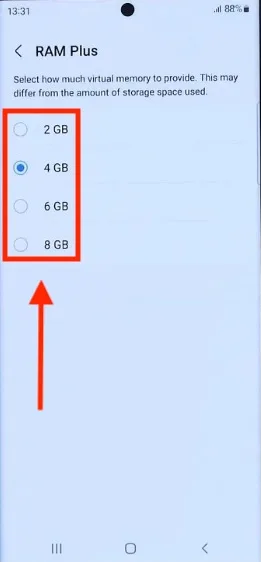
On some phones, the RAM Plus section may appear right inside the Memory section before pressing Clean Now.
Overall, you cannot add physical RAM to your Android phone, but the RAM Plus feature is a decent middle ground. You may still encounter apps on the Google Play Store that claim to increase your device’s RAM. Most of the time, these are simple memory cleaners that do the same job as the built-in cleaning app on your phone.
During our tests with RAM Plus, we noticed that at least 1-2 more apps could stay open in the background than before. It doesn’t matter whether you have a POCO C31 or a Samsung Galaxy M02, you should notice similar differences when activating the RAM Plus setting.
It doesn’t always have to be apps either. Even browser tabs on your mobile browser can take up a significant amount of RAM. If you were to open a couple of some of the best betting sites in India, the homepage animations would take their fair share of RAM almost immediately.
If RAM shortages aren’t affecting your daily use, we recommend not worrying about how much RAM your device uses. RAM is there to be used.
If RAM Plus doesn’t cut it for you and you’d like to have more physical RAM on your Android device, your only option is to upgrade to a newer model. The latest generation of Android phones comes with more RAM each year, so you might be looking at a worthy upgrade.
Android RAM Increase FAQs
Is it possible to increase RAM in an Android phone?
Yes, you can virtually increase the RAM on an Android phone. A physical RAM increase isn’t possible, but you can use the built-in RAM Plus feature to use some of your storage as virtual memory.
How to add 2 GB of RAM to a mobile?
You can use Android’s built-in RAM Plus feature to add 2 GB RAM to your mobile device. This increase will be via virtual RAM, which uses up internal storage.
Is 4 GB of RAM a lot for a phone?
4GB of RAM is not a lot for a phone as of 2026. Most flagship phones are now pushing into the 12+ GB RAM territory, while budget options now cruise between 6 GB and 8 GB RAM.