Jamie
Jamiewp:paragraph
In 2021, people spent 3.8 trillion hours on mobile apps. With more app use, ads on Android devices have increased.
/wp:paragraph
wp:paragraph
Most apps use ads to make money, but they can bother users.
/wp:paragraph
wp:image {“id”:12237,”width”:”676px”,”height”:”auto”,”sizeSlug”:”full”,”linkDestination”:”media”,”align”:”center”}
/wp:image
wp:heading
Why Are Android Ads a Problem?
/wp:heading
wp:paragraph
Ads on Android can be irritating. They pop up often and ruin your time on your phone or tablet. Some ads also track what you do online and collect your info without you knowing.
/wp:paragraph
wp:paragraph
Your info can then be sold to other companies. A survey showed 73% of people worry about online tracking.
/wp:paragraph
wp:heading
How to Stop Ads on Android Device?
/wp:heading
wp:paragraph
Privacy worries push some to switch to iOS, but Android users can fight back. Changing privacy settings can boost security and cut down on tracking. Here’s how to block ads.
/wp:paragraph
wp:image {“id”:12239,”width”:”548px”,”height”:”auto”,”sizeSlug”:”full”,”linkDestination”:”media”,”align”:”center”}
/wp:image
wp:heading
Turn On Chrome’s Ad Blocker
/wp:heading
wp:paragraph
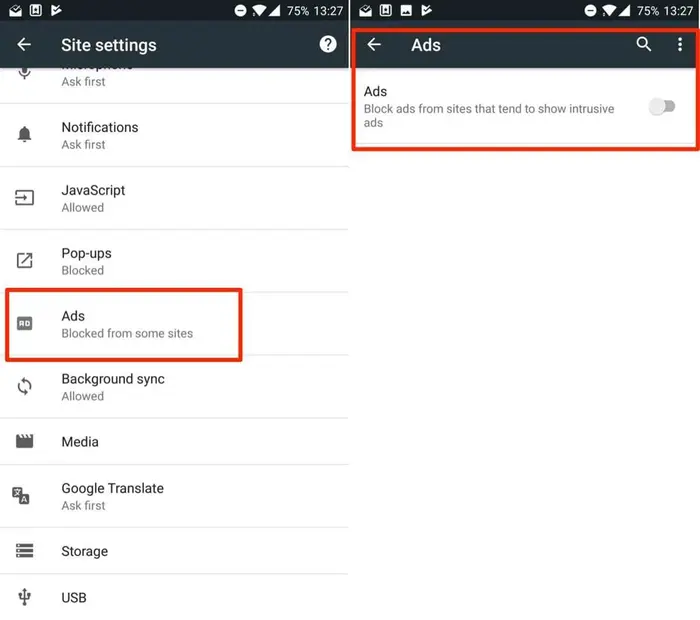
Chrome on Android has an ad blocker, but it doesn’t always work automatically. Here’s how to make sure it does:
/wp:paragraph
wp:list {“ordered”:true}
- wp:list-item
- Open Chrome on your Android.
- Tap the three dots in the top right and pick Settings.
- Choose Site settings.
- Scroll to Pop-ups and redirects and turn on blocking if it’s off.
- Go back, tap Intrusive ads, and switch it on if needed.
/wp:list-item
wp:list-item
/wp:list-item
wp:list-item
/wp:list-item
wp:list-item
/wp:list-item
wp:list-item
/wp:list-item
/wp:list
wp:paragraph
Tip: Turn off notifications from strange websites in Chrome and check the list often.
/wp:paragraph
wp:heading
Get Rid of Home Screen Ads
/wp:heading
wp:paragraph
Ads might show up as banners on your home screen. Here’s how to stop them:
/wp:paragraph
wp:list {“ordered”:true}
- wp:list-item
- Find the app showing ads on your home screen.
- Tap its icon and go to app info.
- Select “Display over other apps.”
- Turn off the “Allow display over other apps” option.
/wp:list-item
wp:list-item
/wp:list-item
wp:list-item
/wp:list-item
wp:list-item
/wp:list-item
/wp:list
wp:heading
Block Ads on YouTube
/wp:heading
wp:paragraph
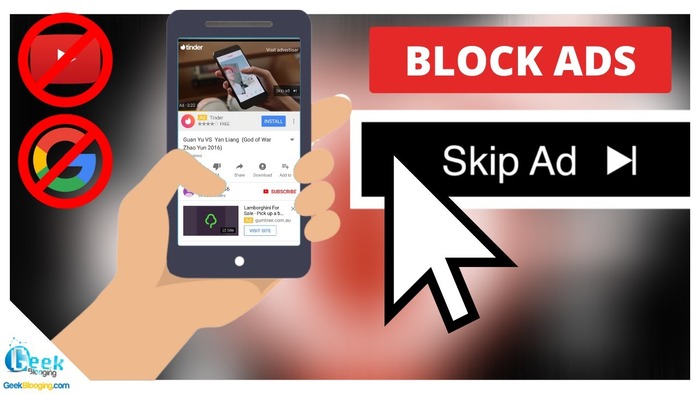
To stop video ads on apps like YouTube, use Firefox. Add the Ghostery Tracker and Ad Blocker extension. It blocks 99% of YouTube ads, including video ones.
/wp:paragraph
wp:paragraph
Tip: Firefox is the only Android browser that allows extensions. Ghostery is one of the few available for it.
/wp:paragraph
wp:image {“id”:12238,”width”:”654px”,”height”:”auto”,”sizeSlug”:”full”,”linkDestination”:”media”,”align”:”center”}
/wp:image
wp:heading
Keep Ads Away While Browsing
/wp:heading
wp:paragraph
Android browsers have some ad-blocking features, but they’re not great.
/wp:paragraph
wp:paragraph
For better protection, use Firefox with the Ghostery extension. It stops pop-ups and guards your privacy on phones and tablets.
/wp:paragraph
wp:paragraph
Pop-up ads can annoy you while browsing, but Ghostery in Firefox blocks them well on Android.
/wp:paragraph
wp:paragraph
Tip: These steps work for Android tablets too.
/wp:paragraph