Jamie
Jamie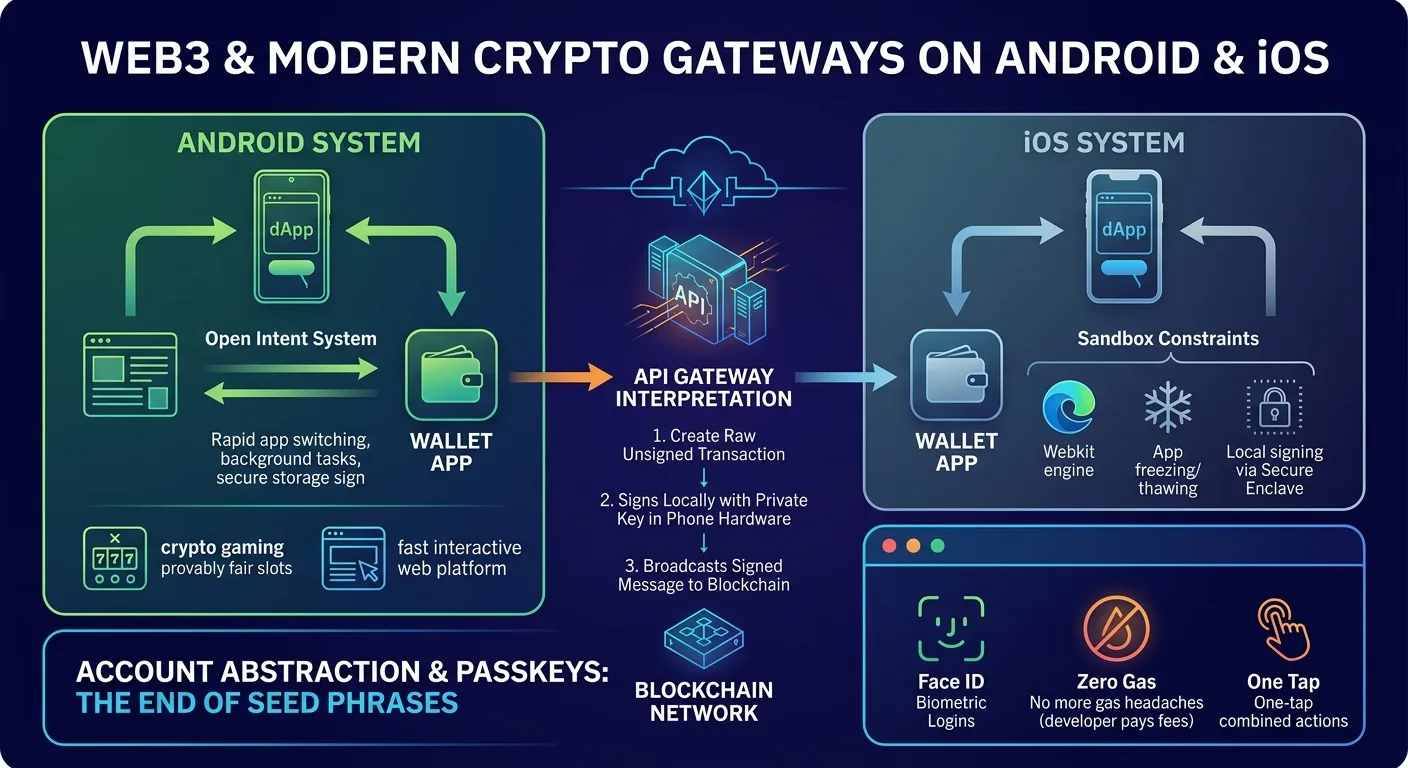
If you’ve been using crypto on your phone lately, you know how much easier it is now than it was before. Not so long ago, attempting to buy something or use an app on mobile meant endlessly copying 40-character wallet addresses, bouncing between three different apps, and hoping your browser didn’t reload and erase your progress halfway through.
Today, connecting a wallet or making a payment on a mobile browser feels almost as easy as double-clicking for Apple Pay. Getting that to happen in the background, though, is actually pretty tricky, mostly because Android and iOS are totally different in terms of security and background apps.
How Mobile Browsers Actually Talk to Wallets?
Traditional websites talk to servers using standard password logins. Web3 apps are different because they need permission to read your private keys.
On a desktop computer, a quick Chrome extension like MetaMask takes care of this. Mobile browsers don’t really support those kinds of extensions, so developers had to figure out two alternative workarounds.
The first option is using built-in wallet browsers. Apps like Trust Wallet or Coinbase Wallet have their own custom web browsers built directly inside them.
When you load a site inside one of these apps, the wallet injects a bit of JavaScript into the page so the site can detect your account immediately.
The second option is deep-linking through protocols like WalletConnect. When you browse on regular mobile Chrome or Safari and tap Connect Wallet, the site sends a temporary bridge signal.
It automatically opens your wallet app, asks you to approve the connection, and then sends you right back to your browser tab without ever exposing your secret keys to the site itself.
Android vs iOS: Different OS, Different Rules
Both operating systems can handle Web3 transactions just fine today, but their internal system rules force developers to build things differently for each platform.
- Android’s Open Intent System: Android apps can change contexts and run background tasks at will. When a web page asks for a signature, Android opens your wallet app, signs the request with the secure storage of your phone, and brings you back to Chrome in a fraction of a second.
- iOS Sandbox Constraints: Apple mandates that all browsers on an iPhone use its WebKit engine, and rapidly freezes background apps to conserve battery. iOS apps use background push notifications and local signing via Apple’s Secure Enclave chip to make sure wallet connections don’t expire when you switch tabs.
What Happens During a Mobile Crypto Payment?
An API gateway is the language interpreter between the site and the blockchain when you buy something online or put money into a web app with crypto.
First, the gateway creates a raw unsigned transaction with the address of the recipient and the estimated network fee. Then, that transaction goes to your wallet app, which takes your private key and signs it locally inside your phone’s hardware. Finally, the signed message goes back to the gateway’s servers, which broadcast it out to the blockchain network.
This setup is what keeps interactive web platforms running fast. For instance, sites running real-time token mechanics or online gaming like provably fair crypto slots rely on these low-latency gateways. Without instant node responses, users would be stuck waiting on manual page refreshes every single time they made a move.
Passkeys and the End of Seed Phrases
The most useful upgrade hitting mobile crypto right now is Account Abstraction, usually paired with Passkeys.
In the past, getting started meant writing down a 12-word seed phrase on a piece of paper and keeping some native tokens like ETH or SOL to pay basic network gas fees.
Account Abstraction transforms hard-coded key pair wallets into smart contract accounts, enabling a suite of real-world quality-of-life improvements:
- No more gas headaches: App developers or payment processors can pay the network fees for you so you can send tokens without holding extra crypto in your balance just to pay for fees.
- Biometric logins: No need to enter passwords or deal with seed phrases; simply approve blockchain transactions with Face ID or your fingerprint scanner.
- One-tap actions: Complex actions can be combined into a single quick confirmation instead of tapping “approve” three times for one trade.
Summary
Mobile Web3 has finally moved past its awkward phase. By pairing smartphone hardware security with smarter deep links and faster gateways, Android and iOS apps can now handle crypto transactions almost as quickly as standard web apps, all while keeping your funds under your direct control.